The low-code IoT platform powered by n8n
Connect Arduino, ESP32 & Raspberry Pi over MQTT or HTTP, control them in real time from web and mobile, and automate everything with drag-and-drop n8n flows — no heavy code required.
24
Devices
21
Online
3
Offline
2
Alerts
Warehouse Temperature
last 24hHumidity
62%
Active alert
Cold Room temp > 8°C
5 min
From sign-up to first telemetry
MQTT + HTTP
Uplink data & downlink control
400+ apps
n8n integrations for automations
100% yours
Self-hosted, no vendor lock-in
The perfect IoT stack
Three parts, each doing what it does best — together, a complete low-code IoT solution.
IoT Platform
Connection & Sensing
Connect Arduino/ESP/Pi over MQTT & HTTP; capture and store telemetry reliably.
n8n
Actions & Alerts
Triggers → actions: notify, escalate, log, call AI and control devices back — no code.
Mobile Apps
Dashboard & Control
Live dashboards, two-way control and push alerts on iOS & Android — from anywhere.
Sense → Automate → Control. The platform senses, n8n decides and acts, and the apps keep you in control.
Everything you need, nothing you don't
A focused feature set designed for makers, teams and beginners.
Connect any device
Guided wizard with copy-paste code for ESP32, Arduino, Raspberry Pi, C++ & Python over MQTT or HTTP.
Two-way control
Buttons, switches & sliders write to virtual pins — control relays, motors & LEDs live, Blynk-style.
Low-code automations with n8n
Drag-and-drop flows react to device events — notify, control, log, or call AI with zero code.
Real-time dashboard
Live telemetry with auto-refresh, number cards, charts, gauges, LED indicators & maps.
MQTT & HTTP built in
A managed MQTT broker and a simple REST endpoint. Uplink telemetry and downlink commands.
Alerts & rules
Trigger on thresholds or device-offline, then hand off to an n8n flow for any action you can imagine.
Web & mobile app
Installable PWA — add IoTFlow to your phone's home screen and control devices on the go.
Self-hosted & open
Docker & Coolify-ready. Own your data and your automation engine, deploy anywhere in minutes.
From sensor to automation in three steps
Devices talk to the platform over MQTT/HTTP. The platform streams to your dashboard and forwards every event to n8n, where you build the logic.
1 · Connect
Flash the wizard snippet to your ESP32/Arduino/Pi. It streams data over MQTT or HTTP.
2 · Visualise & control
Compose a dashboard of charts, gauges, buttons & sliders — on web and mobile.
3 · Automate with n8n
Device events fire n8n flows that notify, control devices back, log data or call AI.
Get started in 8 short tutorials
From zero to a live, automated IoT dashboard — no heavy code required.
1. Create your free account
- 1Sign up with your name and email.
- 2Get your password by email.
- 3Sign in with a code, password or Google.
- 4Set your own password — you're in.
2. Add your first device
- 1Pick (or create) a project.
- 2Open Add Device and name it.
- 3Choose HTTP or MQTT and create it.
- 4Copy the device token (shown once).
3. Send your first reading
- 1Copy a quickstart snippet (cURL, Python or ESP32).
- 2Paste your token + device id.
- 3Run it on your board or Pi.
- 4See it live on the dashboard.
4. Build a dashboard
- 1Click Add widget on the dashboard.
- 2Pick Number, Gauge, Line, LED or Map.
- 3Bind it to a device + metric.
- 4Add more — it auto-refreshes.
5. Control a device
- 1Add a Switch, Button or Slider widget.
- 2Choose a virtual pin (e.g. V1, relay).
- 3Have the device read devices/<id>/down.
- 4Toggle it — the command arrives instantly.
6. Automate with n8n
- 1Add a Webhook node in n8n; copy its URL.
- 2Create an Automation for an event.
- 3Paste the webhook URL and save.
- 4Test it, then let devices trigger it.
7. Upload telemetry every 10 s
- 1Create an MQTT device; copy id + token.
- 2ESP8266: flash the Telemetry_Upload sketch.
- 3Or Python: pip install "iotflow[mqtt]".
- 4Publish every 10 s; watch it live.
8. API keys & alerts
- 1Create an API key (iot_…) — copy it once.
- 2Send data for any device with it.
- 3Create an alert rule, e.g. temp > 30.
- 4Trigger it, then resolve it.
Built for every industry
One platform, endless applications — connect, control and automate across sectors.
Smart Agriculture
Soil moisture, greenhouse climate & irrigation valves — auto-water crops when soil dries out.
Industrial IoT
Monitor motor vibration, temperature & pressure; trip a relay or raise a ticket on anomalies.
Smart Home
Lights, locks, thermostats & sensors controlled from your phone and automated by n8n routines.
Energy & Utilities
Meter voltage, current & solar output; shed load and alert on faults automatically.
Healthcare & Cold Chain
Vaccine fridge & ward monitoring with instant escalation to staff via SMS, email or Slack.
Smart Buildings
HVAC, occupancy & air quality across floors, tuned by schedules and comfort rules.
Logistics & Fleet
GPS + temperature on trucks and containers; geofence alerts and route logging.
Water Management
Tank levels, pump control & leak detection — start/stop pumps on level thresholds.
Retail & Vending
Fridge temps, footfall & stock sensors feeding dashboards and restock automations.
A clean dashboard your whole team will get
See total, online and offline devices at a glance. Watch live telemetry stream in, review recent activity and act on alerts — all from one fast, mobile-friendly interface with a built-in dark theme.
- Auto-refreshing real-time data
- Number cards, charts, gauges & maps
- Per-device telemetry history
- Active alerts with one-click resolve
24
Devices
21
Online
3
Offline
2
Alerts
Warehouse Temperature
last 24hHumidity
62%
Active alert
Cold Room temp > 8°C
Built for real use cases
From a single sensor to a whole fleet.
Environmental monitoring
Temperature, humidity and air quality across rooms, warehouses or farms.
Cold chain & logistics
Track cold rooms and fleet sensors with offline + threshold alerts.
Industrial & energy
Monitor voltage, current and pressure on pumps, machines and panels.
Smart buildings
Bring building sensors into one clean dashboard your whole team can use.
From the blog
Hands-on IoT projects and n8n workflow automations.
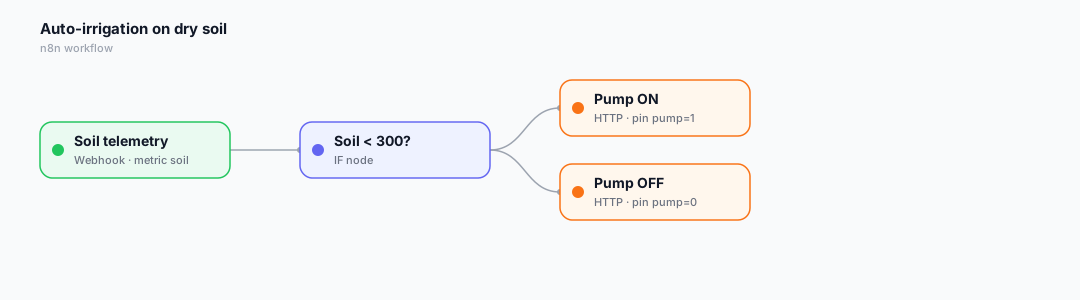
Build a Smart Farm: Auto-Irrigation with ESP32, a Soil Sensor & n8n
Keep your crops watered automatically. Read soil moisture on an ESP32, stream it to IoTFlow over MQTT, and let an n8n flow switch the pump when the soil gets dry.
Read more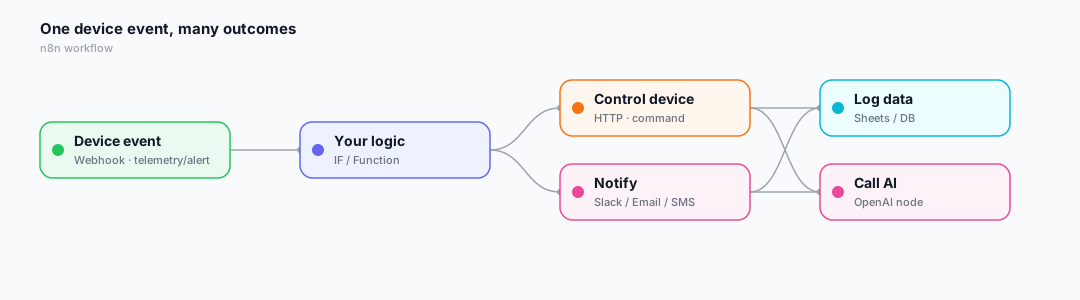
Why n8n Is a Perfect Fit for IoT
The winning IoT stack splits the work three ways: the IoT platform connects and senses, n8n handles actions and alerts, and mobile apps give you the dashboard and control. Here's why that combination is so powerful.
Read more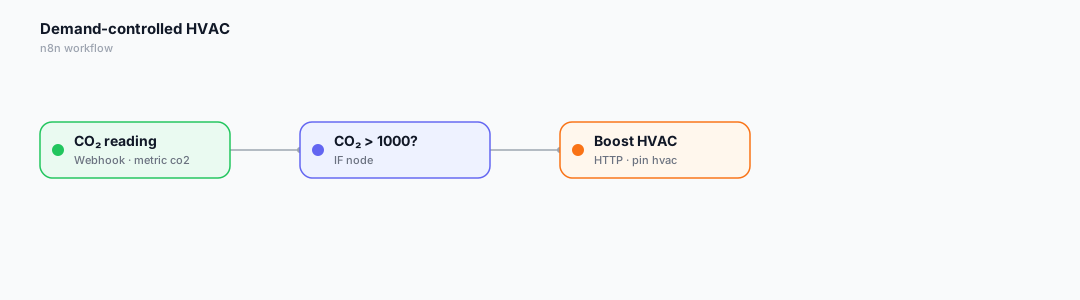
Smart Buildings: Demand-Controlled HVAC with CO₂ Sensing & n8n
Fresh air without wasting energy. An ESP32 + SCD30 measures room CO₂; an n8n flow boosts ventilation only when it's needed, then eases off.
Read moreStart free, upgrade when you grow
Every account gets the full platform. Paid plans add devices and higher message limits.
Free
For learning, class projects and a sensor or two at home.
S$0 / month
- 5 devices
- 60 messages / minute
- 10,000 messages / day
- 2 API keys
- 5 alert rules
- 3 n8n automations
Starter
For makers running a small fleet around the house or lab.
S$5 / month
- 20 devices
- 300 messages / minute
- 100,000 messages / day
- 5 API keys
- 25 alert rules
- 10 n8n automations
Pro
For serious projects, pilots and classrooms.
S$15 / month
- 100 devices
- 1,200 messages / minute
- 1,000,000 messages / day
- 20 API keys
- Unlimited alert rules
- Unlimited n8n automations
Business
For production deployments across sites.
S$49 / month
- 500 devices
- 6,000 messages / minute
- 10,000,000 messages / day
- 100 API keys
- Unlimited alert rules
- Unlimited n8n automations
Every plan includes: Dashboards, charts, gauges & maps · Two-way device control · MQTT & HTTP, Arduino & Python SDKs · iOS & Android apps. Prices in SGD, billed monthly via HitPay — cancel anytime.
Get in touch
Questions, ideas or want help getting started? Send us a note.