Projects7/3/2026
Water Management: Auto Tank Refill with an Arduino & n8n
Never run a tank dry. An Arduino float sensor reports tank level to IoTFlow, and an n8n flow starts the fill pump when the level drops — and stops it when full.
Auto Tank Refill
Manual tank top-ups are easy to forget. An Arduino float/ultrasonic sensor reports the level to IoTFlow; an n8n flow runs the fill pump between low and high thresholds.
Device code (Arduino)
iot.onCommand([](const String& pin, float v, const String&){
  if (pin == "pump") digitalWrite(PUMP, v > 0 ? HIGH : LOW);
});
iot.virtualWrite("level", readLevelPercent());   // 0..100 %
Add a Gauge on level and a Switch on pump to watch and override.
The n8n workflow
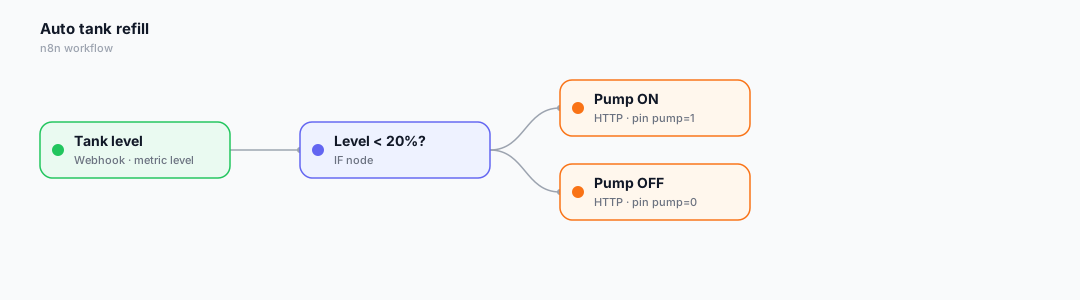
Here is the low-code automation that ties it together. In IoTFlow, every device event (telemetry, alert, command) can be forwarded to an n8n Webhook, and n8n calls back into the platform to control the device.
- The Webhook receives the level reading (metric = level).
- An IF node checks level < 20% (low).
- An HTTP Request starts the pump; another stops it once the tank is full.
Wire it up in 3 steps
- In n8n, add a Webhook node, activate it and copy the Production URL.
- In IoTFlow → Automations → New automation, pick the event and paste the URL.
- Click Test, then let real device data trigger it automatically.
Tip: bind a Switch or Slider widget to the same virtual pin so you can also control the device by hand from the web or mobile app.
Happy building! 🚀
Reviews
Leave a review