Automation7/3/2026
Smart Home: Motion-Activated Lighting with ESP32 & n8n
Lights that follow you. A PIR sensor on an ESP32 triggers an n8n flow that switches a light on, waits, and turns it back off — no hub, no subscription.
Motion-Activated Lighting
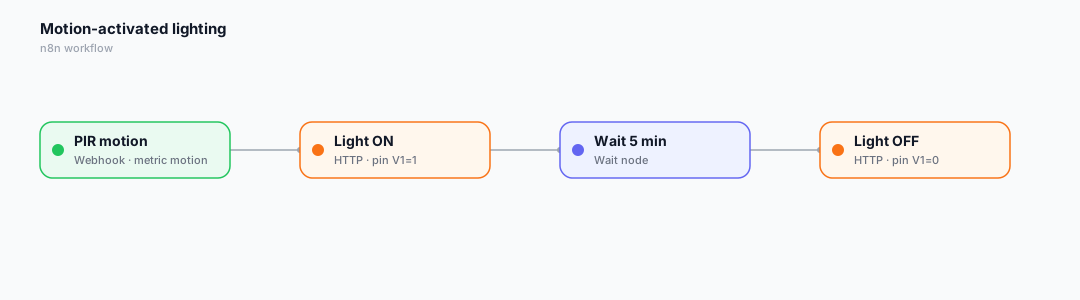
A classic smart-home automation, done with open protocols. A PIR sensor on an ESP32 reports motion; an n8n flow turns the light on, waits five minutes, then turns it off.
Device code (ESP32)
iot.onCommand([](const String& pin, float v, const String&){
  if (pin == "V1") digitalWrite(LIGHT, v > 0 ? HIGH : LOW);
});
// on PIR rising edge:
iot.virtualWrite("motion", 1);
The n8n workflow
Here is the low-code automation that ties it together. In IoTFlow, every device event (telemetry, alert, command) can be forwarded to an n8n Webhook, and n8n calls back into the platform to control the device.
- The Webhook receives motion telemetry (metric = motion).
- An HTTP Request turns the light on (pin V1 = 1).
- A Wait node holds 5 minutes, then a second HTTP Request sets V1 = 0.
Wire it up in 3 steps
- In n8n, add a Webhook node, activate it and copy the Production URL.
- In IoTFlow → Automations → New automation, pick the event and paste the URL.
- Click Test, then let real device data trigger it automatically.
Tip: bind a Switch or Slider widget to the same virtual pin so you can also control the device by hand from the web or mobile app.
Happy building! 🚀
Reviews
Leave a review